0%

AI智慧导游项目——03:多模态相关接口实现

相关服务部署

FunASR部署

项目地址:https://github.com/modelscope/FunASR

下载模型【已下载】

1
modelscope download iic/SenseVoiceSmall --local_dir /root/autodl-fs/FunASR/SenseVoiceSmall

创建虚拟环境

1
2
mkdir ~/autodl-tmp/FunASR && cd ~/autodl-tmp/FunASR
uv init && uv venv --python 3.12

安装依赖

1
2
source .venv/bin/activate
uv pip install funasr networkx sympy pillow triton -i https://mirrors.aliyun.com/pypi/simple/ --trusted-host=mirrors.aliyun.com

安装 torch环境

1
uv pip install torch torchvision torchaudio --index-url https://mirrors.nju.edu.cn/pytorch/whl/cu126

安装ffmpeg

1
apt install ffmpeg -y

测试环境是否可用

下载测试音频

1
cd ~/autodl-tmp/FunASR
1
wget https://shuming-ai-pic.oss-cn-hangzhou.aliyuncs.com/20260127_205117_64624e1eae.mp3

新建测试代码

1
vim test.py

编辑步骤:

  1. 先按i进入编辑模式
  2. 复制内容
  3. ESC退出编辑模式
  4. :wq+回车

复制以下内容

1
2
3
4
5
6
7
8
9
10
11
12
13
14
15
16
17
18
19
20
21
22
23
24
from funasr import AutoModel
from funasr.utils.postprocess_utils import rich_transcription_postprocess

model_dir = "/root/autodl-fs/FunASR/SenseVoiceSmall"

model = AutoModel(
model=model_dir,
vad_model="fsmn-vad",
vad_kwargs={"max_single_segment_time": 30000},
device="cuda:0",
disable_update=True
)

res = model.generate(
input=f"20260127_205117_64624e1eae.mp3",
cache={},
language="auto",
use_itn=True,
batch_size_s=60,
merge_vad=True,
merge_length_s=15,
)
text = rich_transcription_postprocess(res[0]["text"])
print(text)

执行脚本

1
source .venv/bin/activate && python test.py

image-20260127205823903

TTS部署

EdgeTTS部署

创建项目目录

1
cd /root/autodl-tmp && mkdir EdgeTTS  && cd EdgeTTS

创建虚拟环境

1
cd /root/autodl-tmp/EdgeTTS && uv venv --python 3.12

安装依赖

1
source .venv/bin/activate && uv pip install edge-tts -i https://mirrors.aliyun.com/pypi/simple/ --trusted-host=mirrors.aliyun.com

编辑tts.py文件,文件内容如下所示:

1
2
3
4
5
6
7
8
9
10
11
12
13
14
15
16
17
18
19
20
21
22
23
24
25
26
27
28
29
30
31
32
33
34
35
36
37
38
39
40
41
42
43
44
45
46
import asyncio
import edge_tts

class EdgeTTS:
def __init__(self, voice_id="zh-CN-XiaoxiaoNeural", speed=0.0, vol=0.0, pitch=0.0):
super(EdgeTTS, self).__init__()
self.name = "edge_tts"
self.voice_id = voice_id
self.rate = speed
self.volume = vol
self.pitch = pitch

async def atts(self, text, save_path, ratestr, volstr, pitchstr):
communicate = edge_tts.Communicate(text, self.voice_id, rate=ratestr, volume=volstr, pitch=pitchstr)
await communicate.save(save_path)

async def get_audio(self, text, save_path):
#使用edge-tts把文字转成音频
if self.rate>=0:
ratestr=f"+{int(self.rate)}%"
elif self.rate<0:
ratestr=f"{int(self.rate)}%"
if self.volume >= 0:
volstr=f"+{int(self.volume)}%"
elif self.volume<0:
volstr=f"{int(self.volume)}%"
if self.pitch >= 0:
pitchstr=f"+{int(self.pitch)}Hz"
elif self.pitch<0:
pitchstr=f"{int(self.pitch)}Hz"
for _ in range(3):
print(f"EdgeTTS -- voice_id:{self.voice_id} | save_path:{save_path}")
try:
await self.atts(text=text, save_path=save_path, ratestr=ratestr, volstr=volstr, pitchstr=pitchstr)
return save_path
except Exception as e:
print(f"EdgeTTS: {e}")
return None

if __name__ == '__main__':
text = """你好啊,很高兴认识你。"""
audio_path = f"test.mp3"
tts_fun = EdgeTTS()
audio_file = asyncio.run(tts_fun.get_audio(text, audio_path))
print(audio_file)

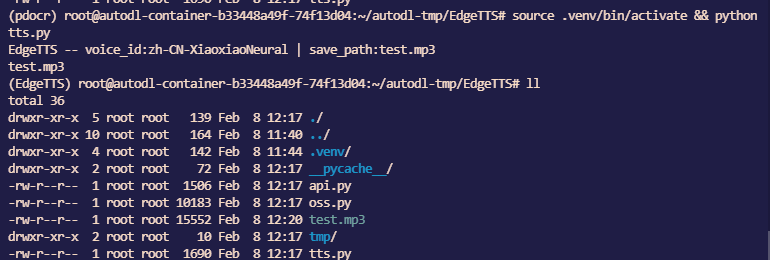
执行测试脚本

1
source .venv/bin/activate && python tts.py

image-20260208122109822

CosyVoice3.0部署【环境有问题可换用EdgeTTS】

项目地址:https://github.com/FunAudioLLM/CosyVoice

下载模型【已下载】

1
modelscope download FunAudioLLM/Fun-CosyVoice3-0.5B-2512 --local_dir /root/autodl-fs/Fun-CosyVoice3

克隆 CosyVoice项目【已克隆】

1
cd ~/autodl-tmp/CosyVoice

项目如果未克隆,则使用以下命令进行克隆。

1
cd ~/autodl-tmp && git clone --recursive https://github.com/FunAudioLLM/CosyVoice.git

创建虚拟环境并激活【已创建】

1
source .venv/bin/activate

如果未创建,使用以下命令

1
2
uv init && uv venv --python 3.10
source .venv/bin/activate

下载依赖

1
2
pip cache purge
uv clean
1
source .venv/bin/activate && uv pip install protobuf==4.25.0 tokenizers==0.21.4 networkx sympy pillow triton -i https://mirrors.aliyun.com/pypi/simple/ --trusted-host=mirrors.aliyun.com
1
uv pip install -r requirements.txt -i https://mirrors.aliyun.com/pypi/simple/ --trusted-host=mirrors.aliyun.com

安装 vllm环境

1
uv pip install vllm==0.9.0 transformers==4.51.3 numpy==1.26.4 -i https://mirrors.aliyun.com/pypi/simple/ --trusted-host=mirrors.aliyun.com

更新 PyYAMLhyperpyyaml

1
uv pip install --upgrade PyYAML hyperpyyaml -i https://mirrors.aliyun.com/pypi/simple/ --trusted-host=mirrors.aliyun.com

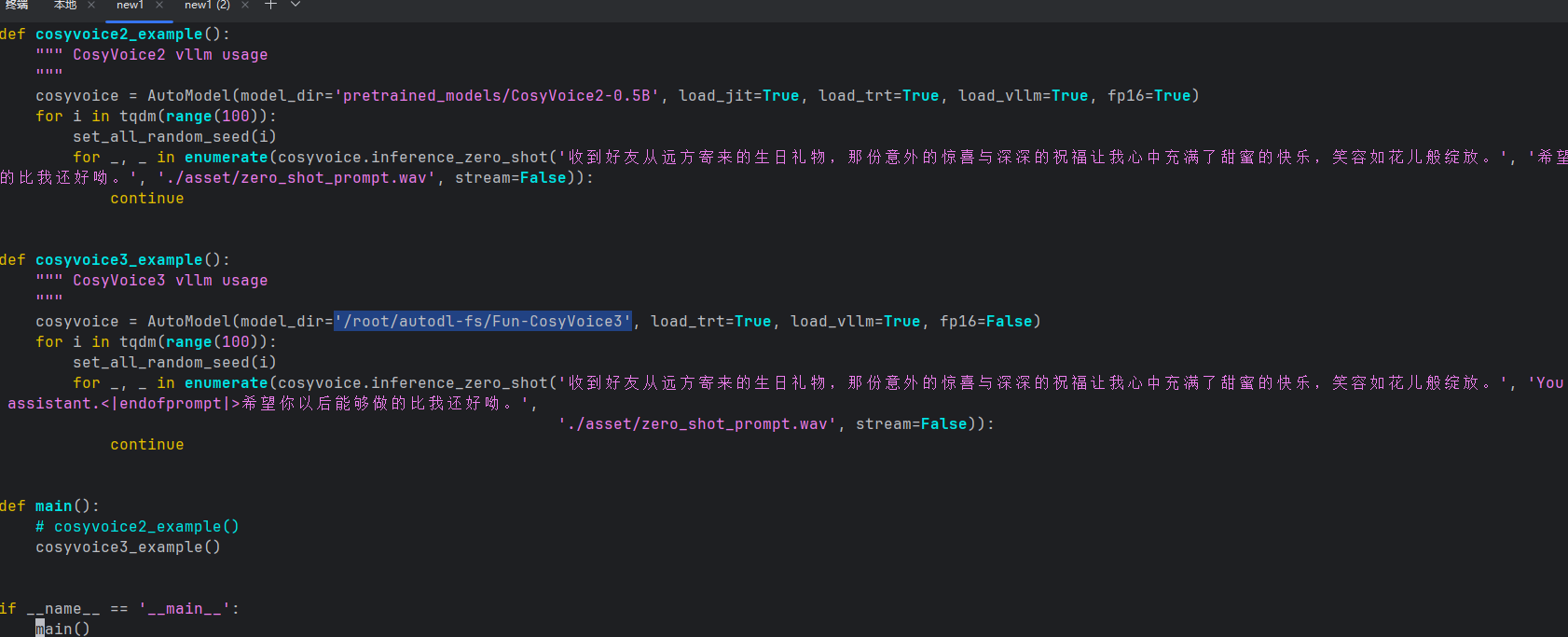
修改测试脚本中模型路径

1
vim vllm_example.py

image-20260205222910838

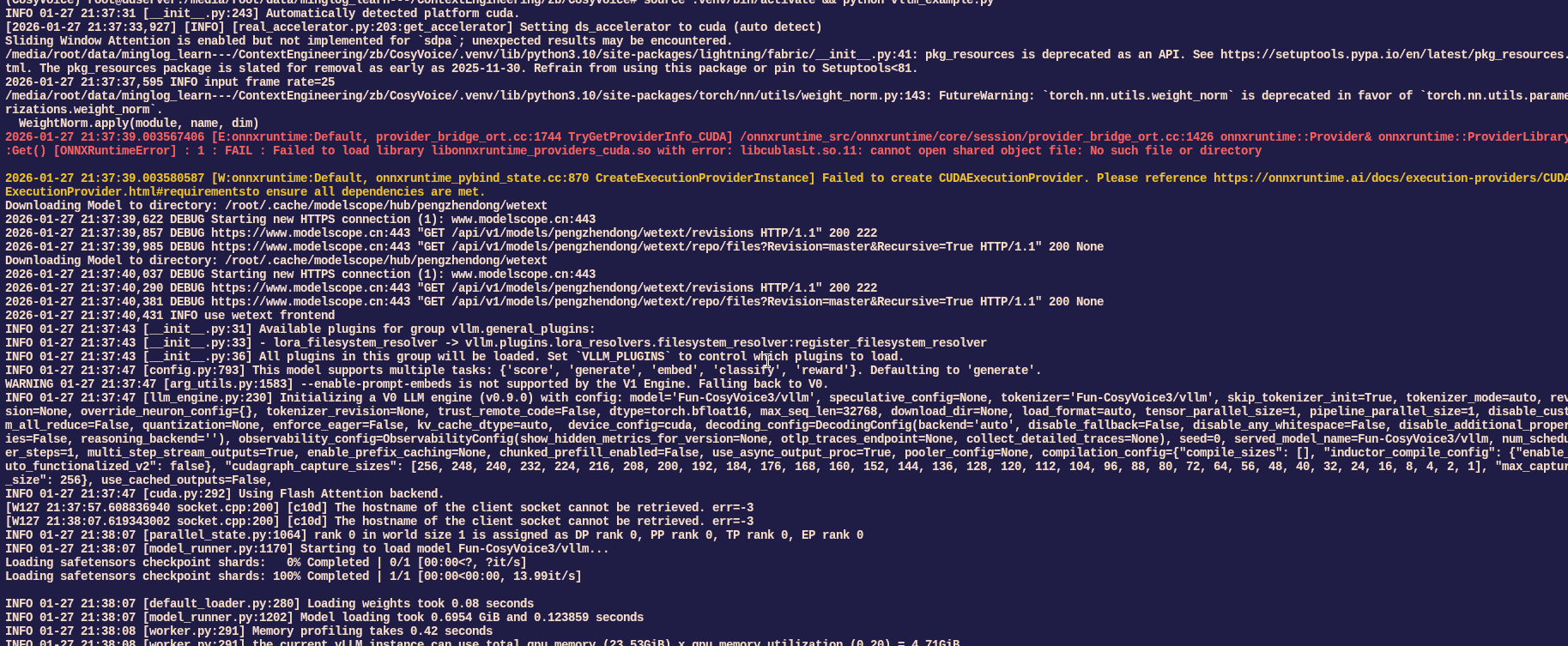
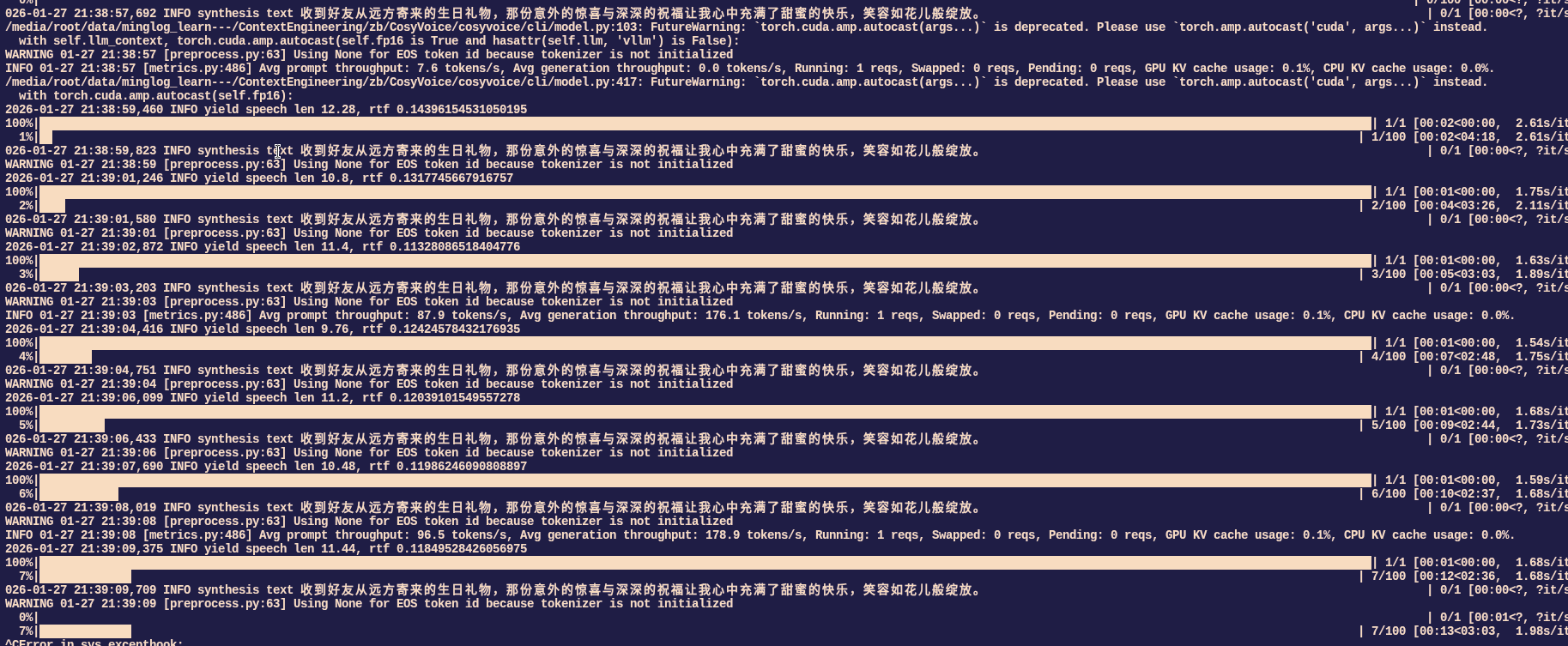
激活虚拟环境,执行测试脚本

1
source .venv/bin/activate && python vllm_example.py

image-20260127214508375

image-20260127214502861

PaddleOCR部署

项目地址:https://github.com/PaddlePaddle/PaddleOCR

创建项目目录

1
cd ~/autodl-tmp && mkdir pdocr  && cd pdocr

创建虚拟环境

1
uv init && uv venv --python 3.12

安装 paddlepaddle环境

1
source .venv/bin/activate && uv pip install paddlepaddle-gpu==3.3.0 -i https://www.paddlepaddle.org.cn/packages/stable/cu126/ --index-strategy unsafe-best-match

安装 paddleocr

1
uv pip install paddleocr -i https://mirrors.aliyun.com/pypi/simple/ --trusted-host=mirrors.aliyun.com

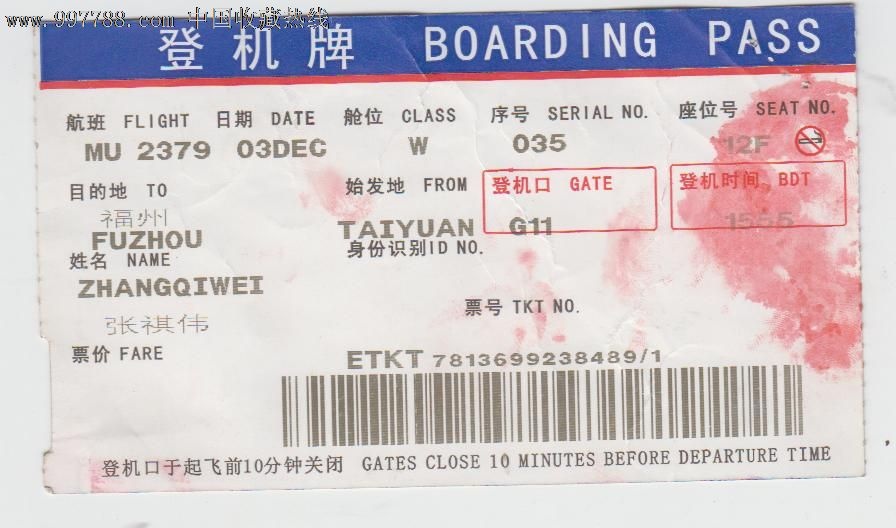
下载测试图片

1
wget https://paddle-model-ecology.bj.bcebos.com/paddlex/imgs/demo_image/general_ocr_002.png -O img.png

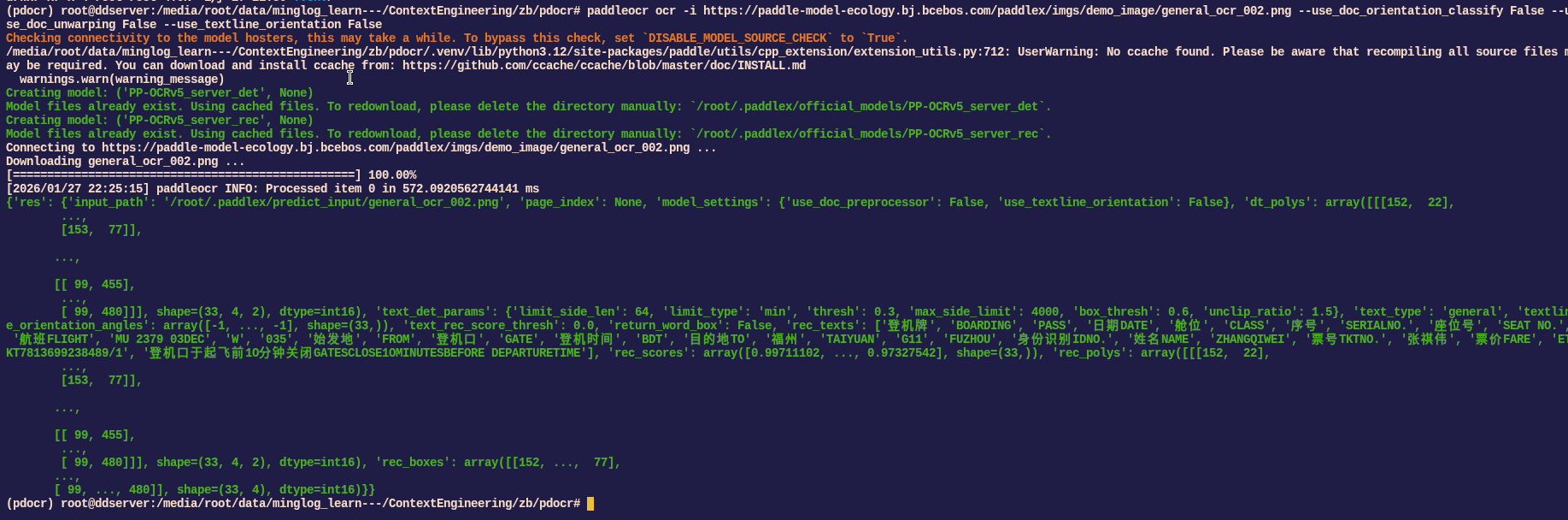
识别测试图片:

20260127_205117_64624e1eae

1
paddleocr ocr -i https://paddle-model-ecology.bj.bcebos.com/paddlex/imgs/demo_image/general_ocr_002.png --use_doc_orientation_classify False --use_doc_unwarping False --use_textline_orientation False 

image-20260127222655403

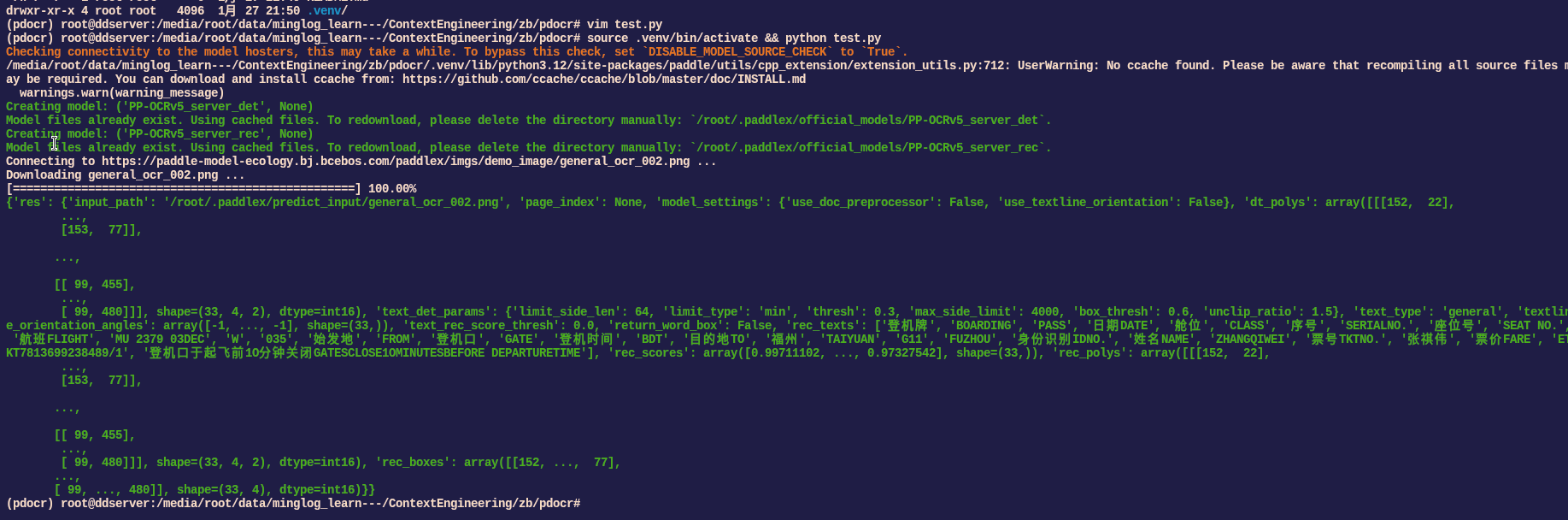
编写脚本测试:

1
vim test.py

复制以下代码:

1
2
3
4
5
6
7
8
9
10
11
12
13
14
15
16
from paddleocr import PaddleOCR
# 初始化 PaddleOCR 实例
ocr = PaddleOCR(
use_doc_orientation_classify=False,
use_doc_unwarping=False,
use_textline_orientation=False)

# 对示例图像执行 OCR 推理
result = ocr.predict(
input="https://paddle-model-ecology.bj.bcebos.com/paddlex/imgs/demo_image/general_ocr_002.png")

# 可视化结果并保存 json 结果
for res in result:
res.print()
res.save_to_img("output")
res.save_to_json("output")

执行脚本:

1
source .venv/bin/activate && python test.py

image-20260127222939852

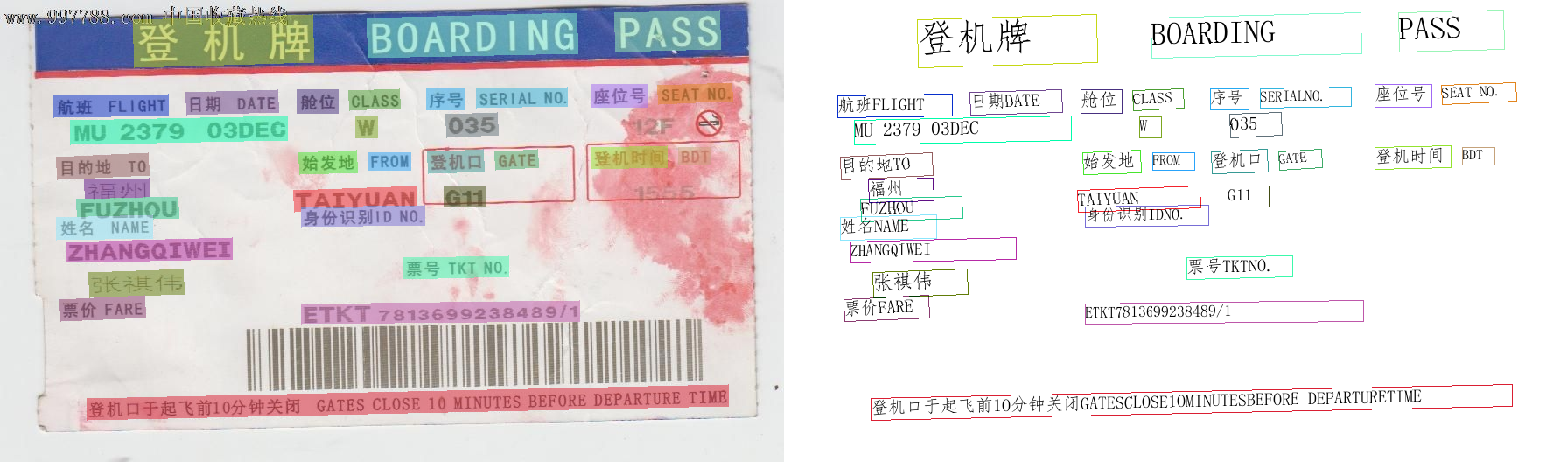
识别结果:

general_ocr_002_ocr_res_img

接口封装

ASR接口封装

下载接口依赖

1
cd /root/autodl-tmp/FunASR && source .venv/bin/activate && uv pip install fastapi httpx uvicorn -i https://mirrors.aliyun.com/pypi/simple/ --trusted-host=mirrors.aliyun.com

然后在项目中新建文件 api.py,填入以下内容:

1
vim api.py
1
2
3
4
5
6
7
8
9
10
11
12
13
14
15
16
17
18
19
20
21
22
23
24
25
26
27
28
29
30
31
32
33
34
35
36
37
38
39
40
41
42
43
44
45
46
47
48
49
50
51
52
53
54
55
56
57
58
59
60
61
62
63
64
65
66
67
68
69
70
71
72
73
74
75
76
77
78
79
80
81
82
83
84
85
86
87
import os, httpx, logging
from uuid import uuid4
from datetime import datetime
from fastapi import FastAPI
from fastapi.middleware.cors import CORSMiddleware
from pydantic import BaseModel
from typing import Optional
import uvicorn
import base64
import tempfile
logging.basicConfig(level=logging.INFO, format='%(asctime)s - %(levelname)s - %(message)s')
logger = logging.getLogger(__name__)

app = FastAPI()

app.add_middleware(
CORSMiddleware,
allow_origins=["*"],
allow_credentials=True,
allow_methods=["*"],
allow_headers=["*"],
)


class ASRRequest(BaseModel):
audio_url: str


class ASRResponse(BaseModel):
msg: str = "请求成功!"
code: str = "SUCCESS"
text: Optional[str] = None


def random_string(length=8):
return f"{datetime.now().strftime('%Y%m%d%H%M%S')}_{uuid4().hex[:length]}"


async def download_url_to_file(url: str, file_type: str):
os.makedirs("downloads", exist_ok=True)
file_path = f"downloads/{random_string()}.{file_type}"
async with httpx.AsyncClient(verify=False) as client:
response = await client.get(url)
if response.status_code != 200:
return None
with open(file_path, "wb") as f:
f.write(response.content)
return file_path


@app.post("/asr", response_model=ASRResponse)
async def asr(request: ASRRequest):
try:
if "http" in request.audio_url:
file_path = await download_url_to_file(request.audio_url, "wav")
if file_path is None:
return ASRResponse(msg="Prompt音频下载失败,请确认文件是否正常。", code="AIEEEOR")
res = model.generate(
input=file_path,
cache={},
language="auto",
use_itn=True,
)
text = rich_transcription_postprocess(res[0]["text"])
logger.info(f"ASR Result: {text}")
return ASRResponse(text=text)
except Exception as e:
logger.error(f"ASR异常: {e}")
return ASRResponse(msg=str(e), code="AIEEEOR")
finally:
# 删除临时文件
if file_path is not None and os.path.exists(file_path):
os.remove(file_path)


if __name__ == "__main__":
from funasr import AutoModel
from funasr.utils.postprocess_utils import rich_transcription_postprocess

model = AutoModel(
model="/root/autodl-fs/FunASR/SenseVoiceSmall",
vad_kwargs={"max_single_segment_time": 30000},
device="cuda:0",
disable_update=True
)

uvicorn.run(app, host="0.0.0.0", port=6000)

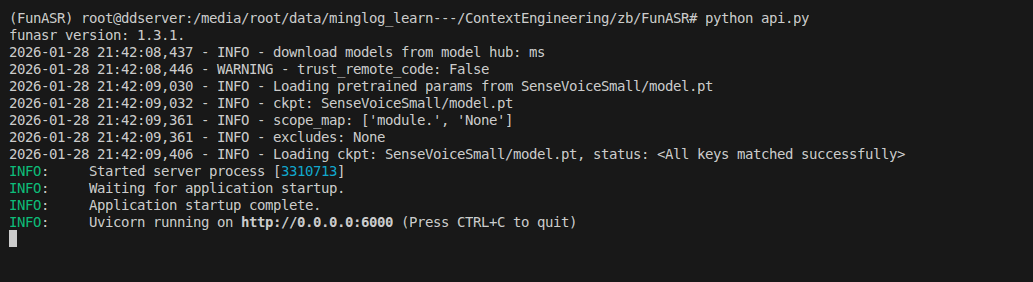
启动后端接口服务:

1
python api.py

image-20260128214219565

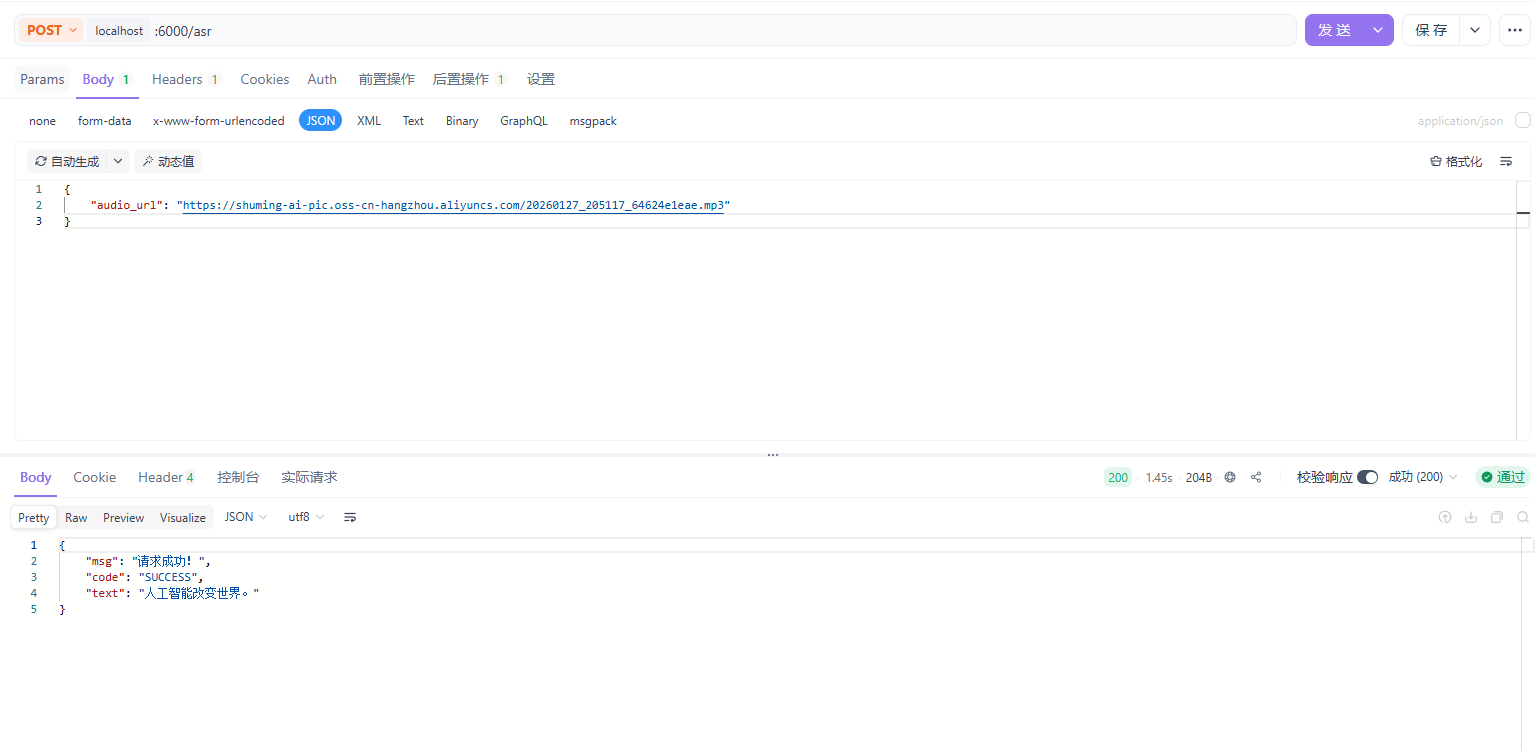
使用 POSTMAN测试接口

请求地址:localhost:6000/asr

请求方法:POST

请求体:

1
2
3
{
"audio_url": "https://shuming-ai-pic.oss-cn-hangzhou.aliyuncs.com/20260127_205117_64624e1eae.mp3"
}

响应示例:

image-20260205222753032

TTS接口封装

Edge-TTS接口

下载接口依赖

1
cd /root/autodl-tmp/EdgeTTS && source .venv/bin/activate && uv pip install fastapi minio uvicorn -i https://mirrors.aliyun.com/pypi/simple/ --trusted-host=mirrors.aliyun.com

然后在项目中新建文件 api.py,填入以下内容:

1
2
3
4
5
6
7
8
9
10
11
12
13
14
15
16
17
18
19
20
21
22
23
24
25
26
27
28
29
30
31
32
33
34
35
36
37
38
39
40
41
42
43
44
45
46
47
48
49
50
51
52
53
from datetime import datetime
import os
from typing import Optional

import uvicorn
from pydantic import BaseModel
from uuid import uuid4
from tts import EdgeTTS
from oss import MinioOSS

import fastapi
app = fastapi.FastAPI()
oss = MinioOSS(
endpoint="ossapi.minglog.cn",
access_key="minglog",
secret_key="minglog666",
bucket_name="test-bucket"
)

# 创建临时目录
if not os.path.exists("tmp"):
os.makedirs("tmp")

# 在模块级创建 TTS 实例,否则用 uvicorn api:app 启动时 tts_model 未定义
tts_model = EdgeTTS()

class TTSRequest(BaseModel):
tts_text: str

class TTSResponse(BaseModel):
msg: str = "请求成功!"
code: str = "SUCCESS"
audio: Optional[str] = None


def random_string(length=8):
return f"{datetime.now().strftime('%Y%m%d%H%M%S')}_{uuid4().hex[:length]}"

@app.post("/tts")
async def tts(text_item: TTSRequest):
text = text_item.tts_text
if (text is None) or (text == ""):
return {"code": -1, "meg": "Text is empty."}
audio_path = f"tmp/{uuid4().hex[:16]}.mp3"
result = await tts_model.get_audio(text, audio_path)
if result is None:
return {"code": -1, "meg": "TTS generation failed."}
audio_url = oss.upload_file(object_name="tts/" + os.path.basename(audio_path), file_path=audio_path)
os.remove(audio_path)
return {"code": 0, "audio_url": audio_url}

if __name__ == "__main__":
uvicorn.run(app, host="0.0.0.0", port=6001)

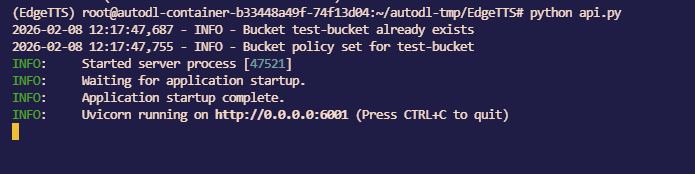
开启接口服务

1
python api.py

image-20260208122434956

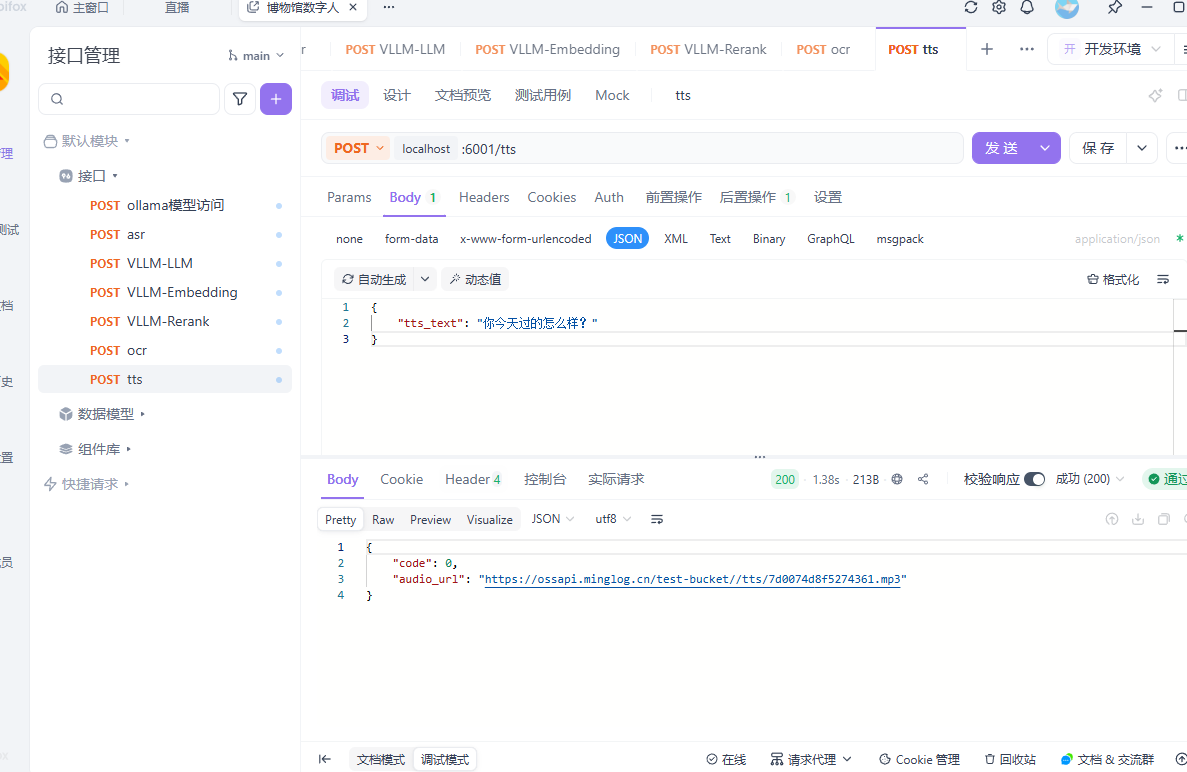
使用 POSTMAN测试接口

请求地址:localhost:6001/tts

请求方法:POST

请求体:

1
2
3
{
"tts_text": "你今天过的怎么样?"
}

响应示例:

image-20260208122534316

CosyVoice接口

下载接口依赖

1
cd /root/autodl-tmp/CosyVoice && source .venv/bin/activate && uv pip install fastapi httpx uvicorn minio -i https://mirrors.aliyun.com/pypi/simple/ --trusted-host=mirrors.aliyun.com

然后在项目中新建文件 api.py,填入以下内容:

1
2
3
4
5
6
7
8
9
10
11
12
13
14
15
16
17
18
19
20
21
22
23
24
25
26
27
28
29
30
31
32
33
34
35
36
37
38
39
40
41
42
43
44
45
46
47
48
49
50
51
52
53
54
55
56
57
58
59
60
61
62
63
64
65
66
67
68
69
70
71
72
73
74
75
76
77
78
79
80
81
82
83
84
85
86
87
88
89
90
91
92
93
94
95
96
97
98
99
100
101
102
103
104
105
106
107
108
109
110
111
112
113
114
115
116
117
118
119
120
121
import sys
sys.path.append('third_party/Matcha-TTS')
import os, httpx, logging
import torchaudio
from uuid import uuid4
from datetime import datetime
from fastapi import FastAPI
from fastapi.middleware.cors import CORSMiddleware
from pydantic import BaseModel
from typing import Optional, Any
import uvicorn
import torch
import asyncio
from concurrent.futures import ThreadPoolExecutor

logging.basicConfig(level=logging.INFO, format='%(asctime)s - %(levelname)s - %(message)s')
logger = logging.getLogger(__name__)

from oss import MinioOSS

oss = MinioOSS(
endpoint="ossapi.minglog.cn",
access_key="minglog",
secret_key="minglog666",
bucket_name="test-bucket"
)

app = FastAPI()

app.add_middleware(
CORSMiddleware,
allow_origins=["*"],
allow_credentials=True,
allow_methods=["*"],
allow_headers=["*"],
)

# 创建线程池用于执行同步的推理任务
executor = ThreadPoolExecutor(max_workers=4)


class TTSRequest(BaseModel):
tts_text: str
instruct_text: Any = "You are a helpful assistant. 使用性格平和、语调平稳的普通话表达。<|endofprompt|>"
prompt_wav: Any = "./asset/zero_shot_prompt.wav"
speed: float = 1.0
stream: bool = False


class TTSResponse(BaseModel):
msg: str = "请求成功!"
code: str = "SUCCESS"
audio: Optional[str] = None


def random_string(length=8):
return f"{datetime.now().strftime('%Y%m%d%H%M%S')}_{uuid4().hex[:length]}"


def run_inference_sync(request_dict):
"""同步执行推理任务,在线程池中运行"""
audio_array_list = []
model_output = cosyvoice.inference_instruct2(**request_dict)
for audio in model_output:
audio_array_list.append(audio['tts_speech'])
audio_array = torch.cat(audio_array_list, dim=1)
return audio_array


async def download_url_to_file(url: str, file_type: str):
os.makedirs("downloads", exist_ok=True)
file_path = f"downloads/{random_string()}.{file_type}"
async with httpx.AsyncClient(verify=False) as client:
response = await client.get(url)
if response.status_code != 200:
return None
with open(file_path, "wb") as f:
f.write(response.content)
return file_path


@app.post("/tts", response_model=TTSResponse)
async def tts(request: TTSRequest):
audio_path = None
try:
if "http" in request.prompt_wav:
request.prompt_wav = await download_url_to_file(request.prompt_wav, "wav")
if request.prompt_wav is None:
return TTSResponse(msg="Prompt音频下载失败,请确认文件是否正常。", code="AIEEEOR")
os.makedirs("outputs", exist_ok=True)
audio_path = f'outputs/{random_string()}.wav'

# 将同步的推理任务放到线程池中执行,避免阻塞事件循环
request_dict = request.dict()
loop = asyncio.get_event_loop()
audio_array = await loop.run_in_executor(executor, run_inference_sync, request_dict)

torchaudio.save(audio_path, audio_array, cosyvoice.sample_rate)
logger.info(f"TTS Result: {audio_path}")
return TTSResponse(
audio=oss.upload_file(object_name="tts/" + os.path.basename(audio_path), file_path=audio_path)
)
except Exception as e:
logger.error(f"TTS异常: {e}")
return TTSResponse(msg=str(e), code="AIEEEOR")
finally:
# 删除临时文件
# if audio_path is not None and os.path.exists(audio_path):
# os.remove(audio_path)
...


if __name__ == "__main__":
from cosyvoice.cli.cosyvoice import AutoModel
cosyvoice = AutoModel(
model_dir="/root/autodl-fs/Fun-CosyVoice3",
load_trt=True,
load_vllm=True,
fp16=False
)
uvicorn.run(app, host="0.0.0.0", port=6001)

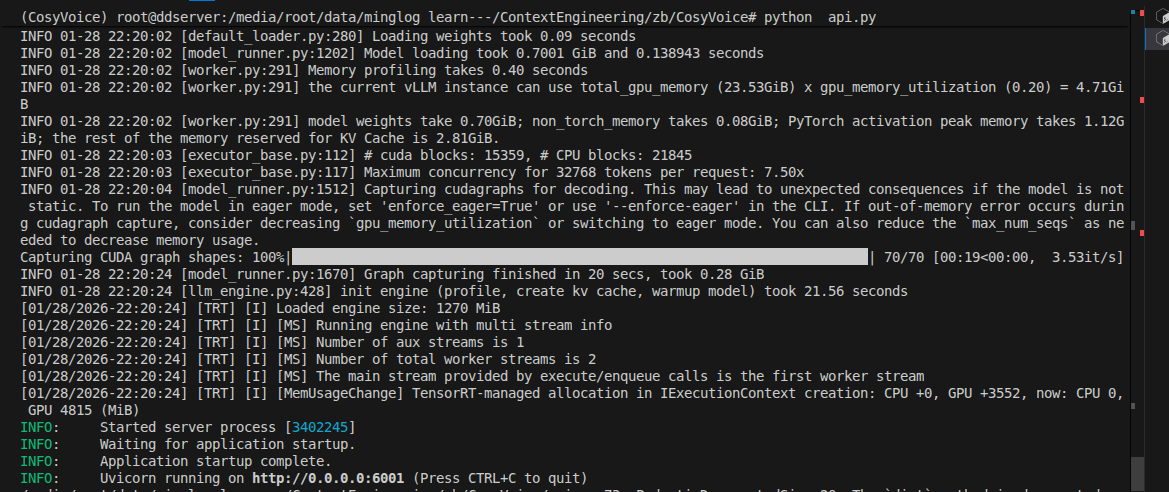
启动后端接口服务:

1
python api.py

image-20260128222727679

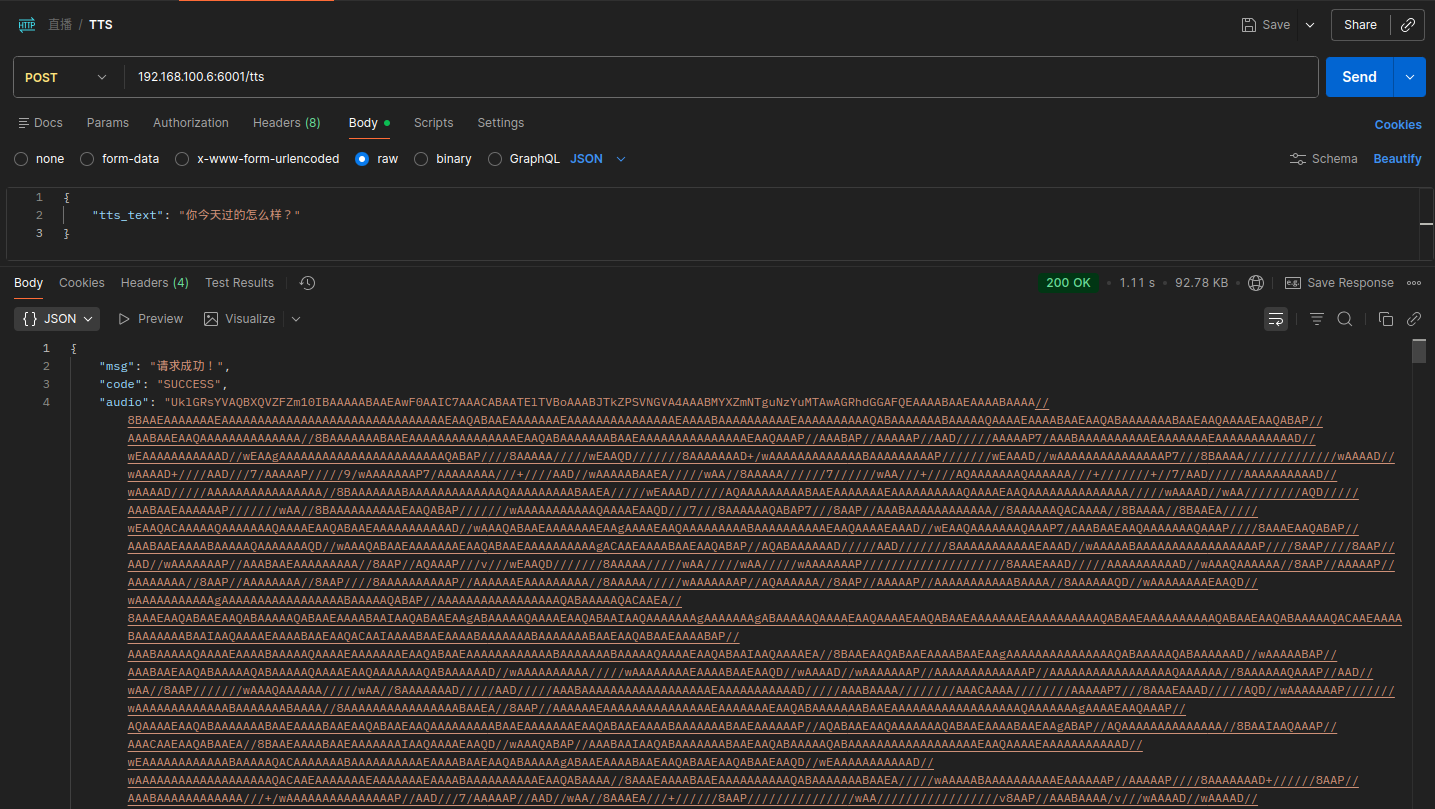
使用 POSTMAN测试接口

请求地址:localhost:6001/tts

请求方法:POST

请求体:

1
2
3
{
"tts_text": "你今天过的怎么样?"
}

响应示例:

image-20260128222824088

OCR接口封装

下载接口依赖

1
cd ~/autodl-tmp/pdocr && source .venv/bin/activate && uv pip install fastapi httpx uvicorn -i https://mirrors.aliyun.com/pypi/simple/ --trusted-host=mirrors.aliyun.com

然后在项目中新建文件 api.py,填入以下内容:

1
2
3
4
5
6
7
8
9
10
11
12
13
14
15
16
17
18
19
20
21
22
23
24
25
26
27
28
29
30
31
32
33
34
35
36
37
38
39
40
41
42
43
44
45
46
47
48
49
50
51
52
53
54
55
56
57
58
59
60
61
62
63
64
65
66
67
68
69
import os, httpx, logging
from uuid import uuid4
from datetime import datetime
from fastapi import FastAPI
from fastapi.middleware.cors import CORSMiddleware
from pydantic import BaseModel
from typing import Optional, Dict
import uvicorn

logging.basicConfig(level=logging.INFO, format='%(asctime)s - %(levelname)s - %(message)s')
logger = logging.getLogger(__name__)

app = FastAPI()

app.add_middleware(
CORSMiddleware,
allow_origins=["*"],
allow_credentials=True,
allow_methods=["*"],
allow_headers=["*"],
)


class OCRRequest(BaseModel):
img_url: str


class OCRResponse(BaseModel):
msg: str = "请求成功!"
code: str = "SUCCESS"
full_text: Optional[str] = None
org_response: Optional[Dict] = None


async def download_byte_data_to_file(audio_url: str, file_type: str):
os.makedirs("downloads", exist_ok=True)
file_path = f"downloads/{datetime.now().strftime('%Y%m%d%H%M%S')}_{uuid4().hex[:8]}.{file_type}"
async with httpx.AsyncClient(verify=False) as client:
response = await client.get(audio_url)
if response.status_code != 200:
return None
with open(file_path, "wb") as f:
f.write(response.content)
return file_path


@app.post("/ocr", response_model=OCRResponse)
async def ocr(request: OCRRequest):
try:
# 使用 PaddleOCR 进行文字识别
result = ocr.predict(request.img_url)
if result:
full_text = "\n".join(result[0].json.get("res", {}).get("rec_texts", []))
return OCRResponse(full_text=full_text, org_response=result[0].json.get("res", {}))
else:
return OCRResponse(msg="未识别到文字", code="NO_TEXT")
except Exception as e:
logger.error(f"OCR异常: {e}")
return OCRResponse(msg=str(e), code="AIEEEOR")

if __name__ == "__main__":
from paddleocr import PaddleOCR
# 初始化 PaddleOCR 实例
ocr = PaddleOCR(
use_doc_orientation_classify=False,
use_doc_unwarping=False,
use_textline_orientation=False)

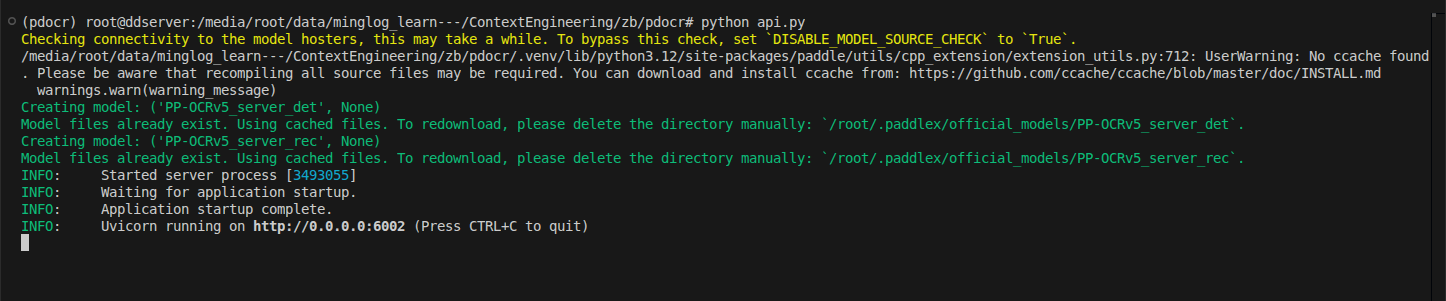
uvicorn.run(app, host="0.0.0.0", port=6002)

image-20260128225608293

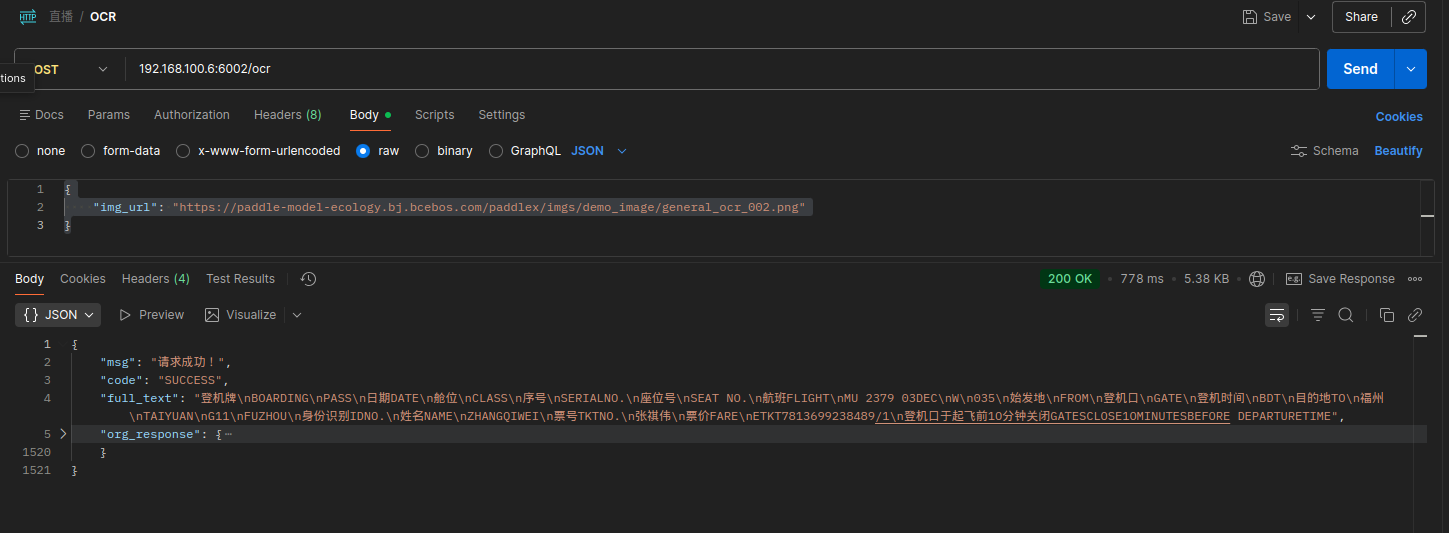
使用 POSTMAN测试接口

请求地址:localhost:6002/ocr

请求方法:POST

请求体:

1
2
3
{
"img_url": "https://paddle-model-ecology.bj.bcebos.com/paddlex/imgs/demo_image/general_ocr_002.png"
}

响应示例:

image-20260128225649341

-------------本文结束感谢您的阅读-------------